

Introducing the new Member Portal
Motorsport Australia is pleased to announce your new Member Portal is now live.
The goal is simple: turn the previously slow and, let’s be honest, clunky experience into one that’s fully digital, integrated and seamless. This is a major transformation that will roll out in phases across the next two years.
Phase One won’t fix everything at once, but it will deliver a meaningful step forward.
We’re replacing the previous platform (used for membership, licencing, vehicles, permits and events) to make your regular touchpoints simpler, faster and easier to navigate across mobile, desktop and the Motorsport Australia app.
Importantly, the new Member Portal has been designed in consultation with you, for you. It will focus on delivering a:
- simpler, easy-to-navigate process across all areas
- faster and more streamlined process for licences, permits, events and logbooks
- simple digital profile for your licence and vehicle information
- single portal that is home to all your information
Need help?
If you are encountering any issues, or have any suggestions or feedback about the new Member Portal, please contact info@motorsport.org.au
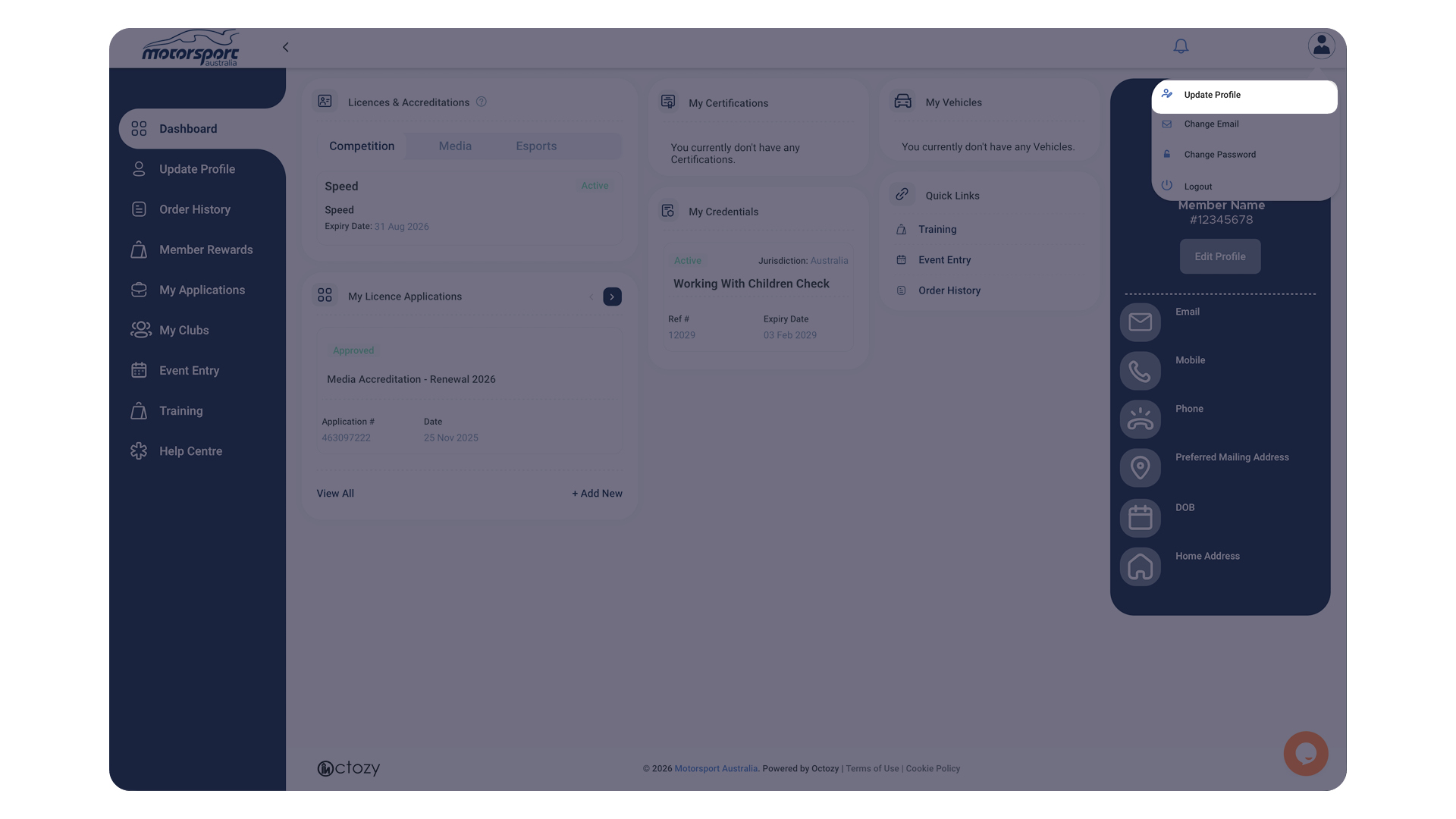
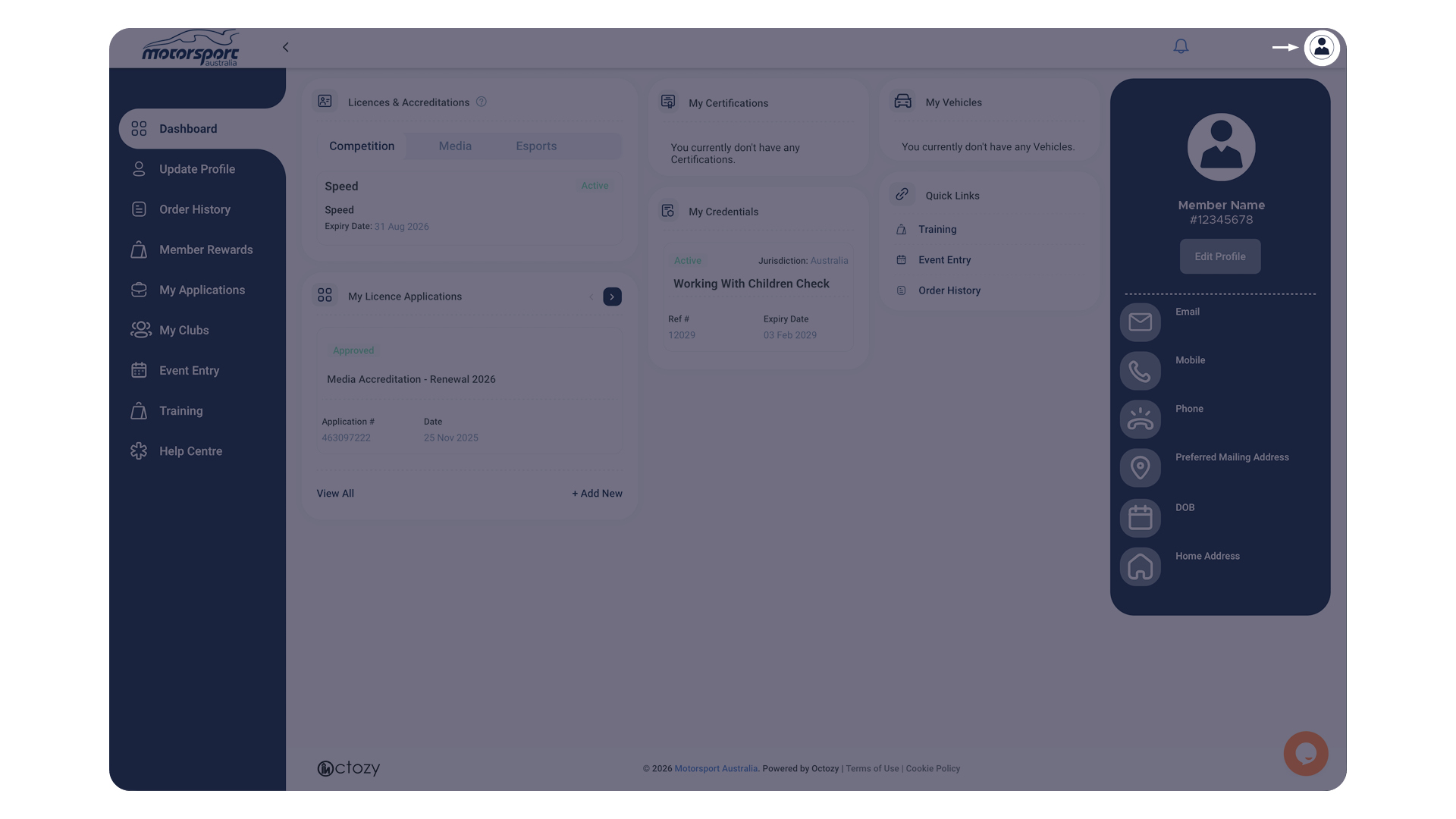
Select the icon on the top right corner, it will open up a small selection menu.
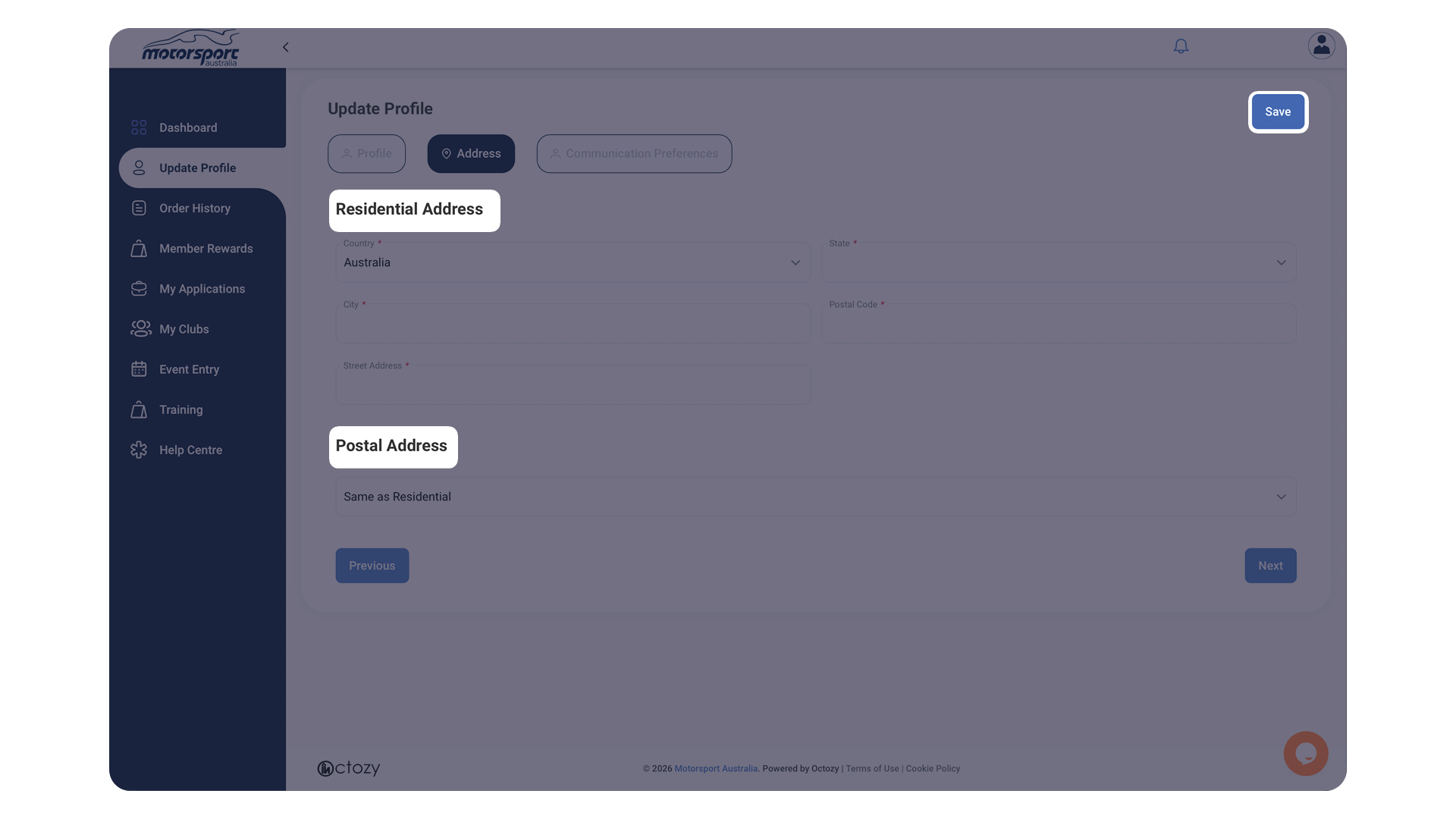
Select ‘Update Profile’, and allow the window to open up.
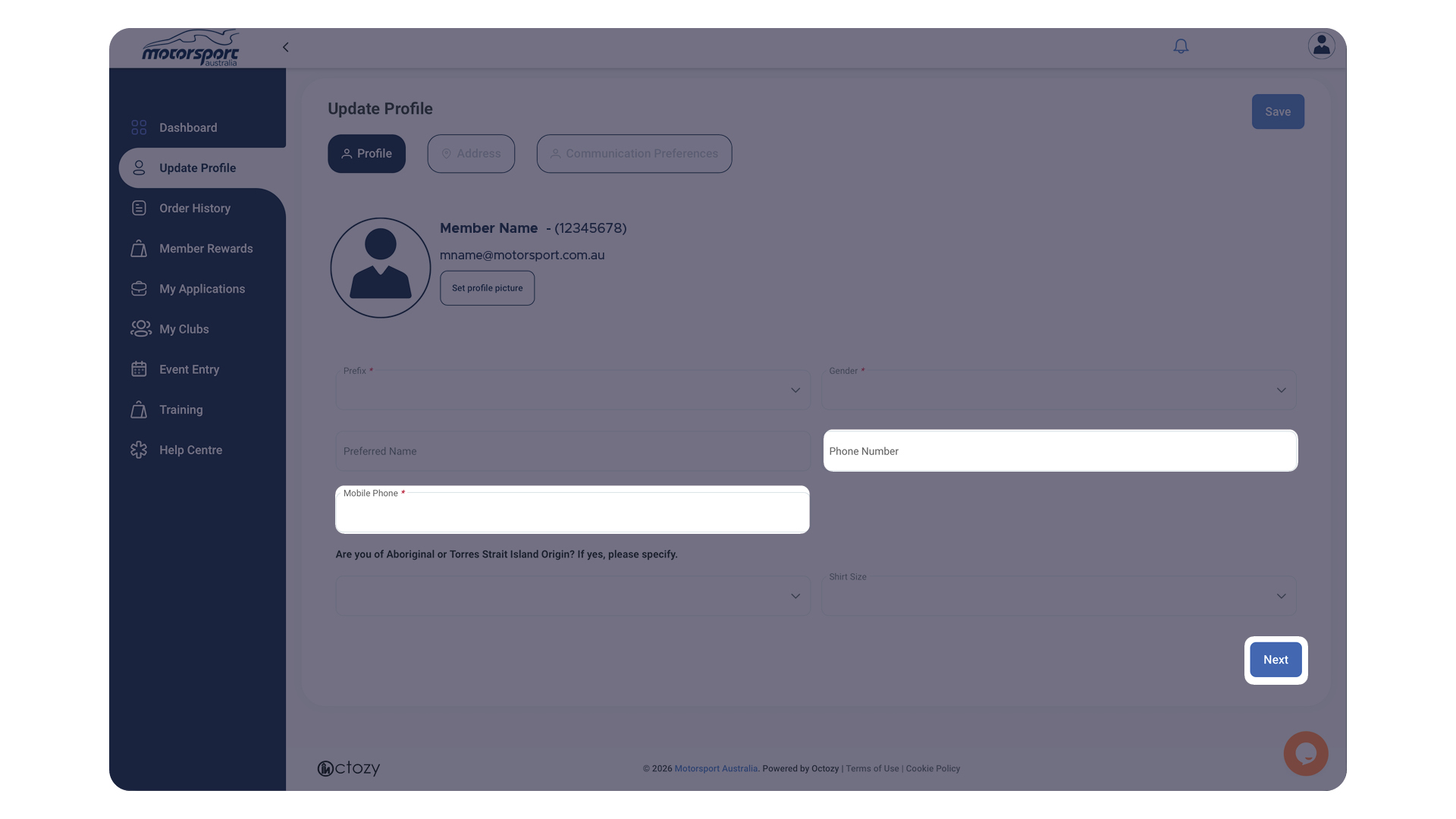
Review and update any information that you need to on this page, then select the ‘Next’ button.
Update any information that you need to on this page, and once completed, select ‘Save‘.
Allow a few seconds for it to save, and check to see if it has updated on your screen.
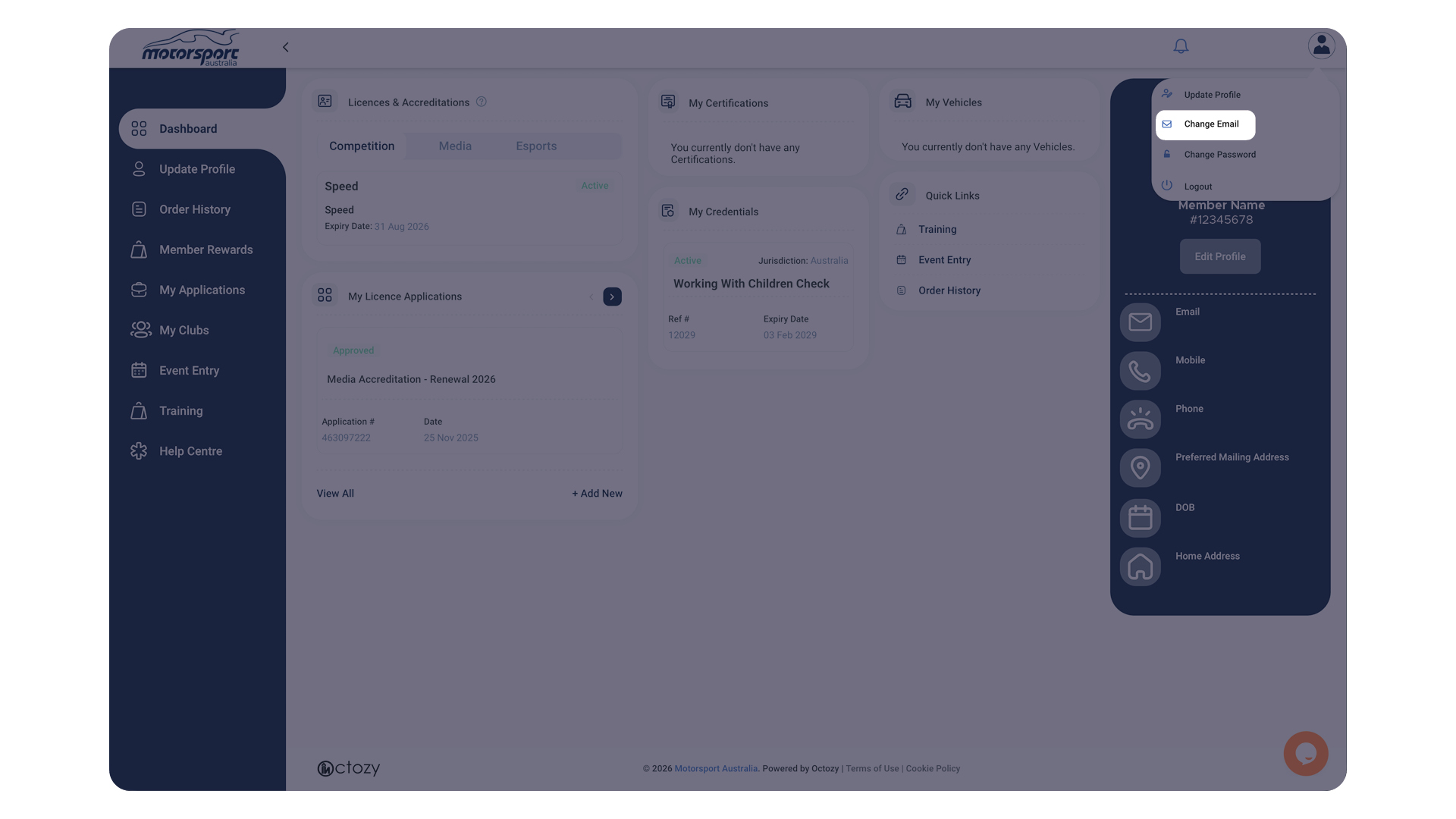
Select your icon on the top right corner.
Click ‘Update Email‘, and allow the window to open.
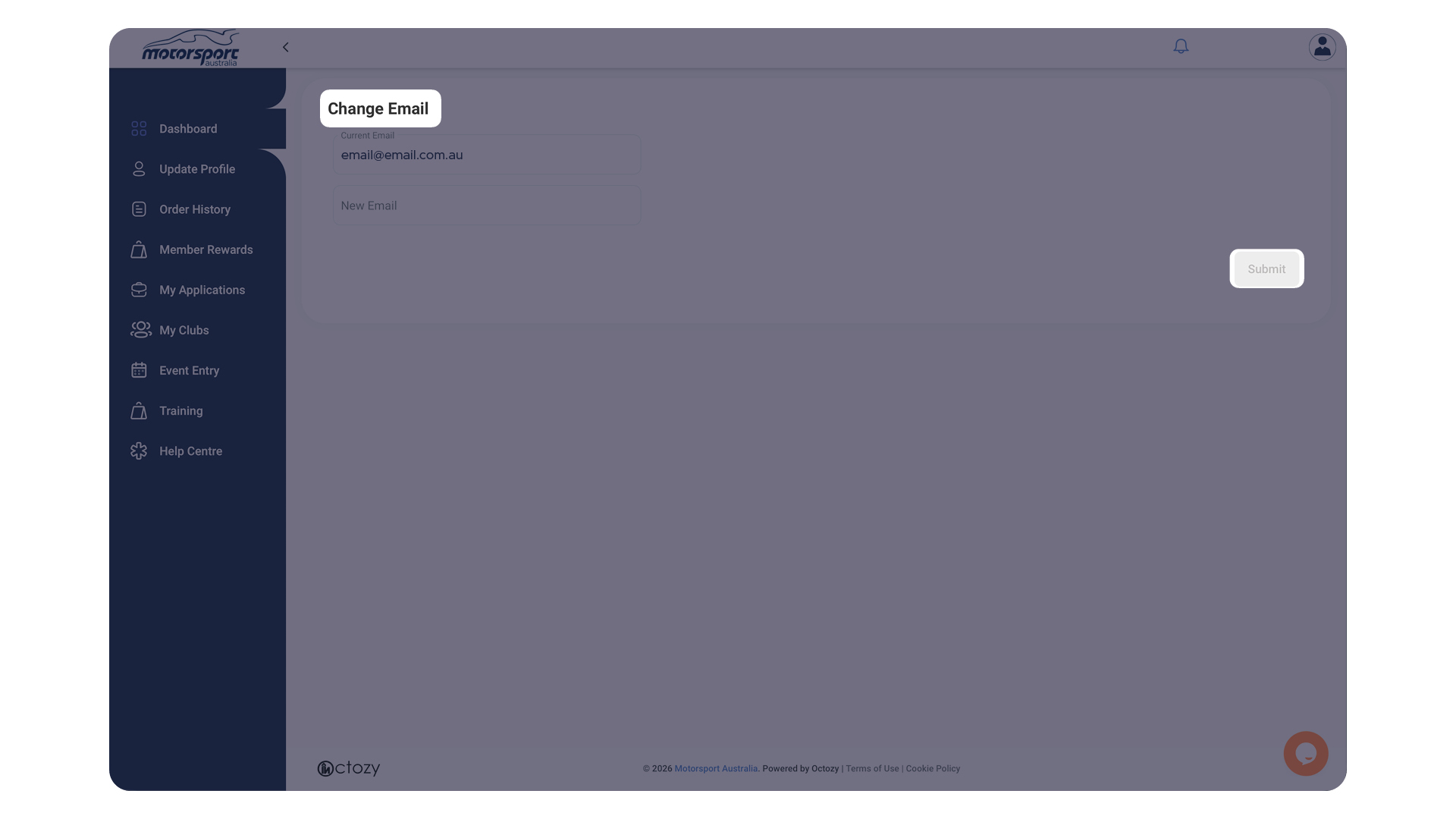
Make sure you are using a current email address. Update your email, if you need to, in the ‘New Email‘ box.
Select ‘Submit‘ when you have finished adding your new email.
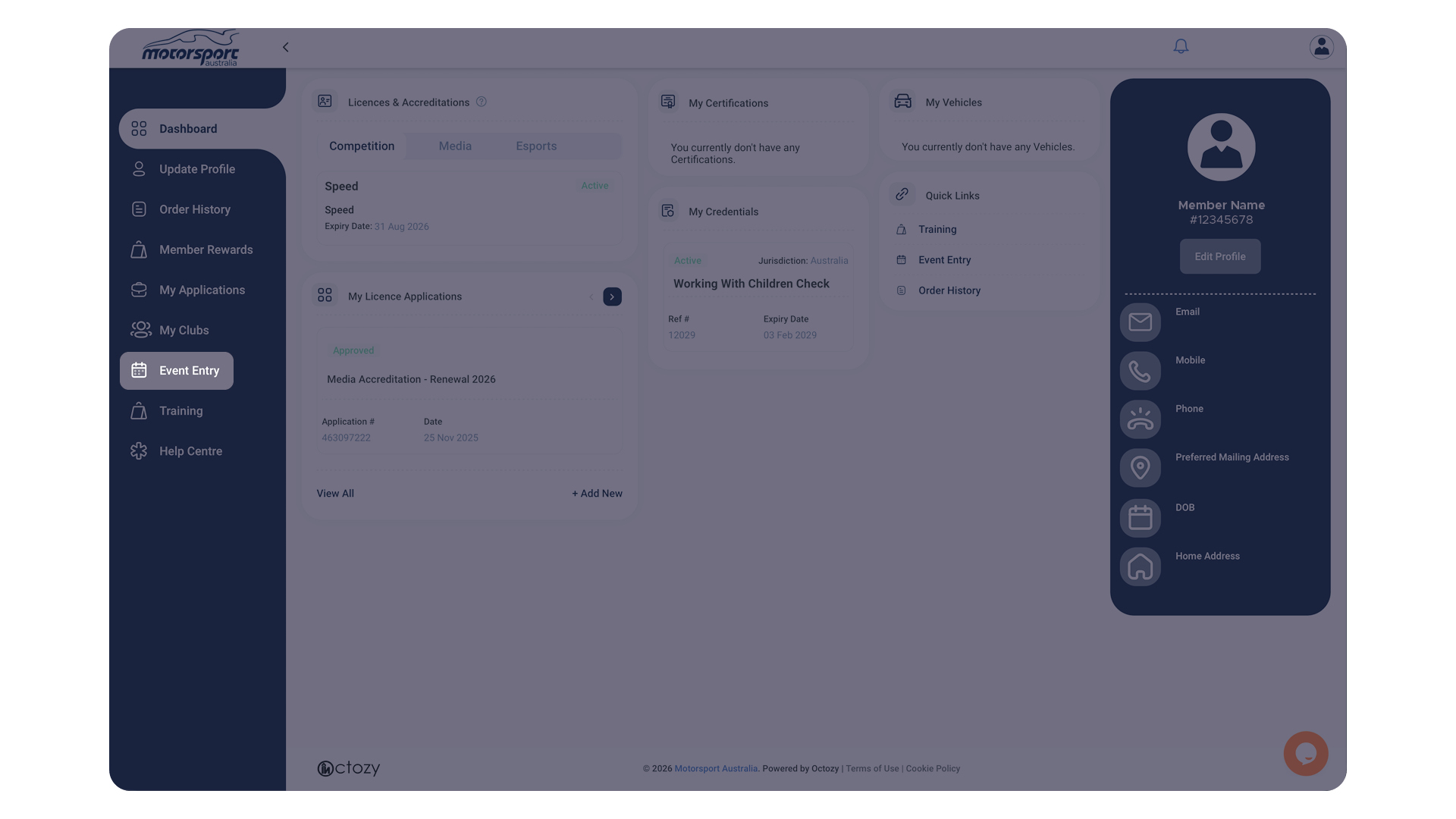
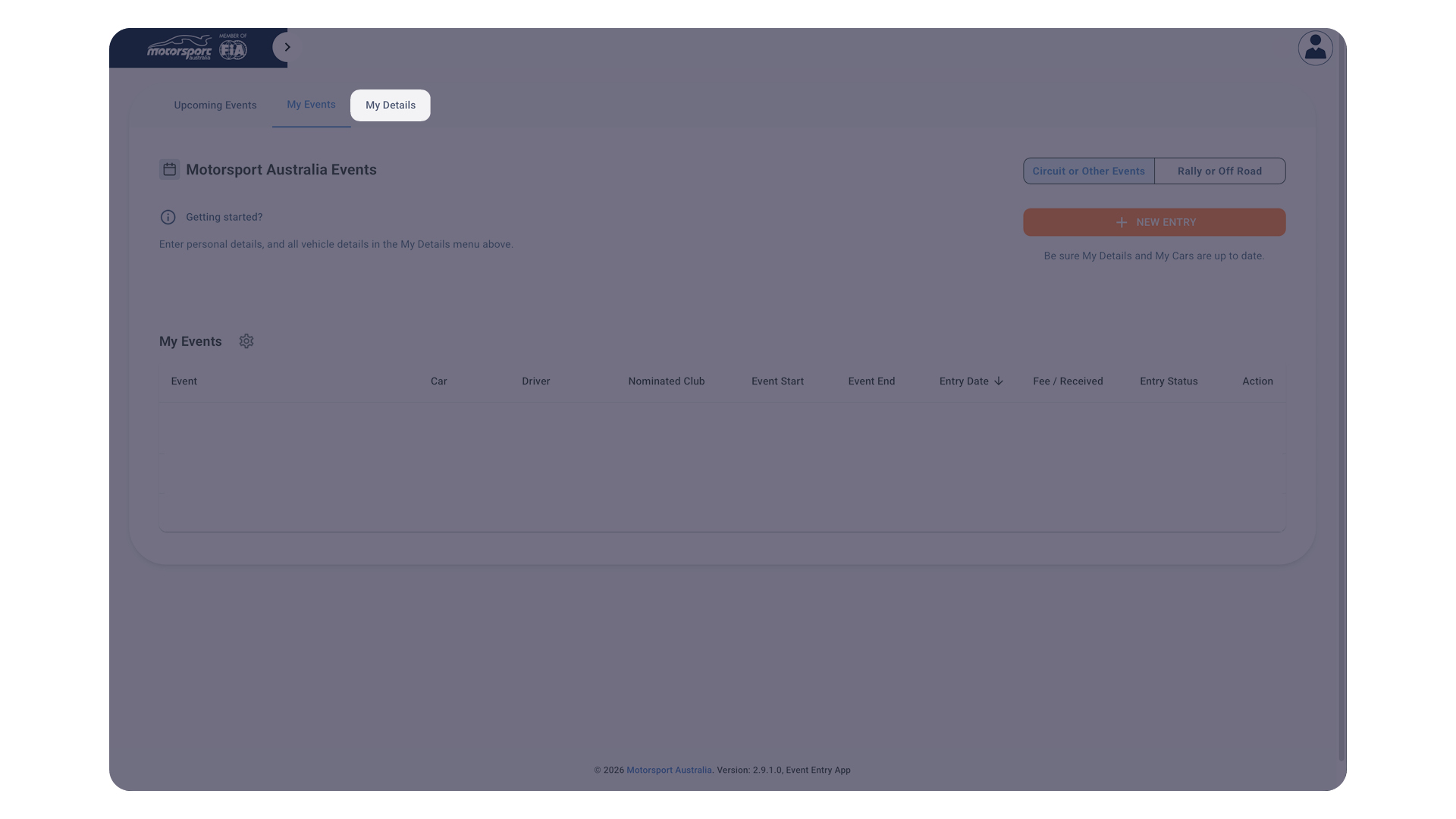
Select ‘Event Entry‘ on the left navigation menu, and allow it to load.
Select ‘My Details‘.
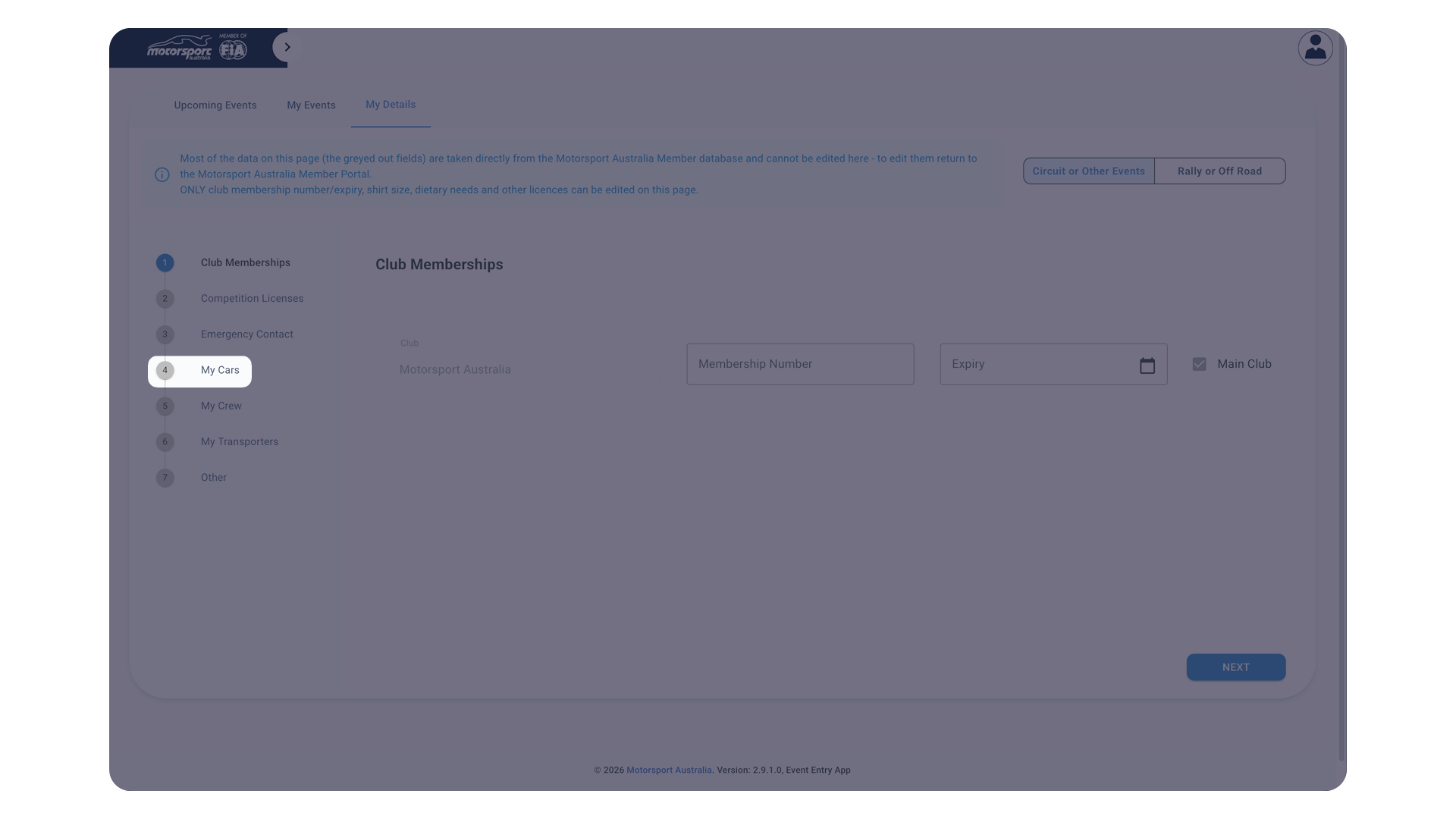
Select ‘My Cars‘.
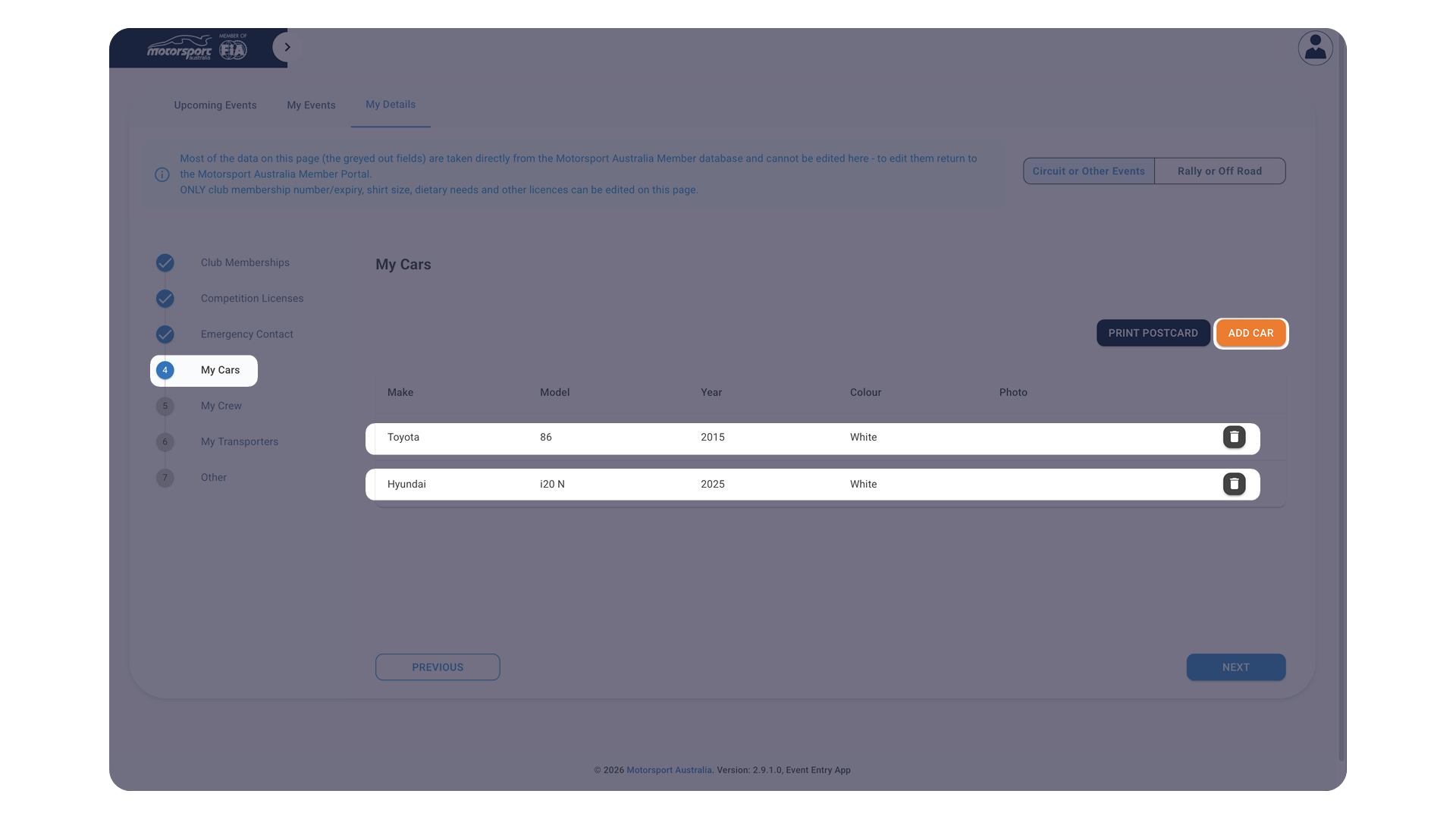
Update your existing cars by selecting them, and don’t forget to hit ‘Save‘ when you have finished.
Remove old cars by using the bin icon.
Add new cars by clicking on the ‘Add Car‘ button.
FAQs about entering Vehicles to an Event Entry, or adding a Vehicle to your profile
How do I enter a vehicle I don’t own?
As an interim measure, we will be temporarily removing the permitted driver requirements, and allow all drivers to search for a vehicle by VIN only.
To do this, simply Enter an Event, and where the section asks for a vehicle, press the ‘Search’ button, and search for a VIN/Chassis Number. If it matches with our records, the car will be linked to your entry for the event.
OR
If the car has a Motorsport Australia Log Book, or a previously saved non-Log Book Vehicle, the Owner can update their profile to allow you as a ‘Driver’
To do this, the Owner needs to:
- Click on the name in the navigation menu (top right), and click ‘Profile‘,
- When the left menu loads, click ‘Crew Management’.
- Click ‘Add Crew’, then click on the magnifying glass icon and enter the Member ID of the driver. You can also enter their details manually if they are not listed on the system, or do not presently hold a Motorsport Australia Licence.
- Select their ‘Role’ as ‘Driver’ and click ‘Submit‘. Then these vehicles will show up for that driver when they are completing an Event Entry and select a vehicle.
If you are still unable to add a car to your entry, please contact logbooks@motorsport.org.au for further assistance.
A vehicle I own doesn’t appear in my profile.
If your vehicle does not require to hold a Motorsport Australia Log Book, you will need to manually add it again to your Profile.
Do this by clicking ‘Register a new Vehicle’, and follow the steps.
If your vehicle does hold a current and valid Motorsport Australia Log Book, and you are the listed owner in your physical log book, then you can enter an event as per normal.
If the vehicle does hold a current and valid Motorsport Australia Log Book, and it is not showing in your profile, there may have been a transfer of ownership problem. Please fill out a form located here, and send it to logbooks@motorsport.org.au.
If you require further assistance with your vehicle, please contact logbooks@motorsport.org.au.
How do I nominate others as additional drivers?
If you are the registered owner of a Motorsport Australia Log Booked vehicle – or accepted non-log booked vehicle – and you are loaning, leasing, or simply permitting another driver to participate in your vehicle on a regular basis, you can add that driver as part of your Crew.
- Edit your Profile, and click on ‘Crew Management’,
- Click ‘Add Crew’,
- Click on the magnifying glass icon and enter the Member ID of the driver. You can also enter their details manually if they are not listed on the system, or do not presently hold a Motorsport Australia Licence,
- Select their ‘Role’ as ‘Driver’, and click ‘Submit’.
From there, the Driver can enter any event with any vehicle that you have Log Booked.
To remove a Driver, again click on ‘Crew Management’ and you can remove them from your Crew. They will no longer have access to your vehicles.
Alternatively, you can also enter an Event but list the nominated driver within the entry form.
Can I enter an event, but nominate another Driver?
Yes.
If you are the registered owner as per the Motorsport Australia Log Book, you may lodge an entry for an event but list another Motorsport Australia licence holder to compete in the vehicle.
The Driver/s must be added to your profile prior to entering the event.
To do this:
- Edit your Profile, and click on ‘Crew Management’,
- Click ‘Add Crew’,
- Click on the magnifying glass icon and enter the Member ID of the driver. You can also enter their details manually if they are not listed on the system, or do not presently hold a Motorsport Australia Licence,
- Select their ‘Role’ as ‘Driver’, and click ‘Submit’.
You can then enter the event, and nominate the driver in the ‘Driver‘ section.
How do I add or update my existing vehicle?
Go to your Profile, and click on ‘My Vehicles’.
From there, the steps are straightforward with regard to adding a new vehicle, or editing an existing vehicle.
For any new vehicles that require a Motorsport Australia Log Book, you still need to allow time for the log book to be processed before it is approved.
Likewise if you have acquired a vehicle with a Motorsport Australia Log Book, you will need to complete a Change of Ownership Form prior to adding it to your Profile.
What if I don’t have a Motorsport Australia Log Book?
If you have built a new car intended for Circuit Racing, Rally, Off Road, or any competition that requires it, then you will need to apply for a Motorsport Australia Log Book.
If you have acquired a car with an existing Motorsport Australia Log Book but it is not yet registered under your name, you will need to complete a Change of Ownership Form.
FAQs about the New Portal
Why did Motorsport Australia change the system?
We heard the feedback, and we heard it from many sources. The old system was not user-friendly.
What is changing?
Motorsport Australia changed the online platform used for Membership, Licencing, Officials, Media Accreditation, Vehicles, Logbooks, Permits, Event Entry and Event Registration to a single unified and seamless platform.
What’s new in the new system?
Well, everything.
From the way it looks, to the functionality and how you interact with it. It’s all changed.
We know that change can be difficult, but the new system structure will be easier to use, with all relevant information in a single system.
How do I access the new system?
The new Member Portal is currently live and can be accessed at portal.motorsport.org.au
What if there are details that I need to change that I can’t do myself on the Member Portal?
You can contact our Member Services team to assist you.
When will it be ready?
The system is currently live and active, with more improvements and features to come across the next 18–24 months.
What will happen to my data?
All existing member data migrated to the new platform, where it will be stored in a secure environment with relevant data protections.
How do I learn how to use the new system?
There will be multiple ways we will update members, including online tutorials, FAQs, and step-by–step instructions based on any common feedback we receive.
Is the system secure?
Yes, the new system will enhance our security position. We take data security seriously and are looking to ensure we maintain the highest levels of data security.
What else is coming?
This is just the beginning. We are looking to fully automate our permits processes for our grassroots events.
We are also looking to expand our digital vehicle and logbook systems which could support digital scrutineering in the future.
Additionally, we want to expand the events capabilities to further support our clubs in hosting events. As part of this upgrade, we’re looking to reduce paper-based forms, replacing them with dynamic digital forms that are easy to use.
How do I contact Motorsport Australia if I need help?
Our Member Services team are ready and waiting, whichever way you want to connect.
Phone: 1300 883 959 (9am–5pm AEST, Monday to Friday)
Email: info@motorsport.org.au
Chat online using the chat function, this can be found within the current Member Portal.
Will the old systems still work with the new systems?
No. This has replaced the old system.
Will my logbook become digital?
Now, no.
In the future, yes.
In the meantime, you can still manage your logbook requests (including new logbook vehicles, renewals, extensions, replacements, payment) in the new Member Portal.
Do I still need a paper logbook at events?
For now, yes.
Physical logbooks will still be required at events.
What if I don’t have an email address?
We use email to share a lot of member information, so this is the preferred contact and communications tool.
If you do not wish to use an email address, please notify the Member Services team, who will provide you with an alternative login method using a Member ID and password.
What if I share my email with another member?
If you are unable to have individual email addresses, we will be able to accommodate you logging in with a Member ID, and a password upon request.
Is this new system going to increase our licence fees?
No.
FAQs about Event Entry
Is the Event Entry process changing?
Yes. The Event Entry system is being upgraded to work with the new and fully integrated member portal. Event Organisers will be able to apply for Permits and then seamlessly begin creating their events in the same place.
For participants, the system will automatically link membership data with event entries, making the sign‑up process smoother and more accurate.
This upgraded platform will continue to evolve, improving the entire permit‑to‑event experience for grassroots and state‑level competitions.
Will the old systems still work with the new systems?
No. This has replaced the old system.
FAQs about Log Books & Vehicle History
Will my log book become digital?
Now, no.
In the future, yes.
In the meantime, you can still manage your log book requests (including new log book vehicles, renewals, extensions, replacements, payment) in the new Member Portal.
Do I still need a paper log book at events?
For now, yes.
Physical log books will still be required at events.
I need to apply for a new log book soon - should I wait?
No.
Digital log books are planned for the future, and we’ll contact you well in advance when they’re ready. It won’t be this year.
I just paid for a physical log book - will I have to pay again?
No.
The launch of digital log books is still some time away. We will give you plenty of notice and we’ll make sure the transition is smooth and fair.
Will I lose the history of my historic vehicle?
No.
Your existing log books and history will remain intact.
Will physical log books still be available?
Yes.
We expect physical logbooks will continue to be available for those who need them, likely with an additional fee. How physical and digital work together for the purpose of scrutineering will be a major focus over the coming year. We won’t change anything until we’ve got it right.
FAQs about Future Features
When will digital log books be launched?
Not this year. We don’t have a confirmed date yet. Digital logbooks are part of a larger transformation planned across the next 18–24 months.
When will the new Portal be live?
It was launched on Tuesday 7 July, 2026.
FAQs from Scrutineers
We don’t have the equipment for digital logbooks.
We hear you. Digital scrutineering will require careful planning, testing and consultation. That work hasn’t begun yet, and nothing will change overnight. The new Portal is simply the first step.
I’m not good with technology, maybe it’s time to retire.
Please don’t. Our goal is to make this system as easy as possible for everyone. It won’t be perfect on day one, but we’ll provide training and simple guides to help you get comfortable.
I’ve heard promises like this for 10 years - it’ll never happen.
We understand the scepticism. But this time, the work is already underway. We’re committed to building technology that genuinely supports our members and the future of the sport. While we can’t promise exact dates for every feature, we can promise that we’re investing in the long-term health and accessibility of the sport.